



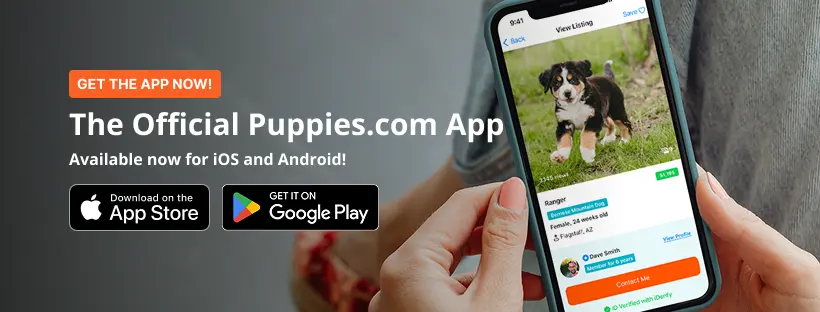
Whether you are searching for your next puppy or listing your next litter, the Puppies.com app makes it easier than ever to connect, communicate, and never miss a moment.
America's most trusted puppy platform just got even better. The Puppies.com app is now available on the App Store for iPhone and has been completely revamped for Android on Google Play. Whether you are a puppy buyer or a breeder, this is the update you have been waiting for.
Since 2003, Puppies.com has been connecting puppy lovers with trusted, verified breeders across the United States. Now, everything you love about the platform is available at the palm of your hand, any time of day, anywhere you are.
Download the Puppies.com App For Free


For Buyers: Find Your Perfect Puppy From Anywhere
Searching for a puppy should be exciting, not stressful. The Puppies.com app puts thousands of verified puppy listings from trusted breeders across the country right in your pocket — and finding the puppy that fits your life has never been simpler.
Search Thousands of Verified Listings
Browse tens of thousands of active puppy listings from verified breeders nationwide. Filter by breed, location, age, and price to find exactly what you are looking for. Whether you want a Goldendoodle in Georgia or a French Bulldog in Phoenix, the Puppies.com app helps you find your match faster.
Save Your Favorites and Set Alerts
Found a puppy you love? Save them to your favorites and come back any time. Set alerts for new puppies that match your criteria so you are always the first to know when a new litter becomes available. The right puppy moves fast, and alerts ensure you never miss out when a puppy that matches your preferences becomes available.
Connect Directly With Verified Breeders
Every breeder on Puppies.com has a detailed profile complete with photos, testimonials, and verification badges. You can see exactly who you are working with before you ever send a message. When you are ready to connect, message breeders securely and directly through the app.
Free to Download. Free to Search.
The Puppies.com app is completely free for buyers. Browse thousands of verified listings, save favorites, and set alerts at no cost. Your perfect puppy is waiting, and finding them just got a whole lot easier.
For Breeders: Your Business, In Your Pocket
Your puppies deserve to be seen, and serious buyers are searching for them right now. The Puppies.com app gives breeders the tools to reach more buyers, manage listings on the go, and never miss an inquiry again.
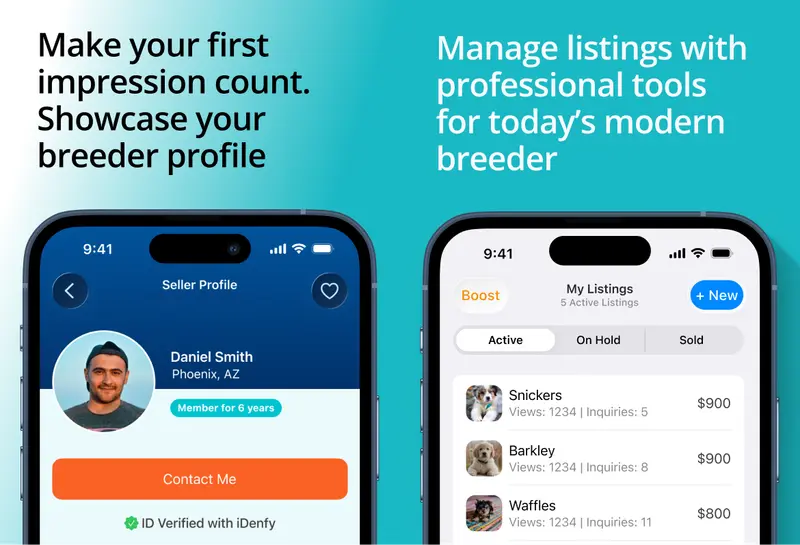
Place Your Listings in Front of Millions of Buyers
1M+ puppy searches happen on Puppies.com every single month. Your listings do not just reach buyers in your neighborhood; they reach puppy lovers from coast to coast. With millions of searches every month, Puppies.com puts your puppies in front of active buyers from every state, every day.
Get Seen More Often. Place More Puppies into Loving Homes.
The Puppies.com app is built to help your listings perform. Clean, informative listings with clear photos and complete details get noticed, and the app makes it easy to keep everything up to date from wherever you are. More visibility. More inquiries. More puppies are placed in loving homes.
Never Miss an Inquiry Again
Puppy seekers are searching day and night, and when they find a puppy they love, they reach out immediately. The Puppies.com app keeps you connected 24 hours a day, 7 days a week, so you never miss a message from a serious buyer. Real-time notifications mean you are always the first to respond.
Make Your First Impression Count
Your breeder profile is your first impression — and on Puppies.com, it is a powerful one. Showcase your experience, your program, and your puppies with a profile that builds buyer confidence before they ever contact you. ID verification, email verification, and phone verification badges tell buyers exactly what they need to know: you are the real deal.
Edit Your Listings on the Go
Update your listings, add new puppies, edit photos, and manage your profile from anywhere. No more waiting until you are at a computer. Whether you are at the kennel, on the road, or at home, your listings are always polished and up to date.
Safe and Secure In-App Messaging
All communication between breeders and buyers happens through Puppies.com's secure in-app messaging system. Every conversation stays in one place and is easy to access, manage, and continue, no matter how many inquiries you are juggling at once.
How to Download the Puppies.com App on iPhone
Getting started on iPhone takes less than two minutes. Here is exactly how to do it:
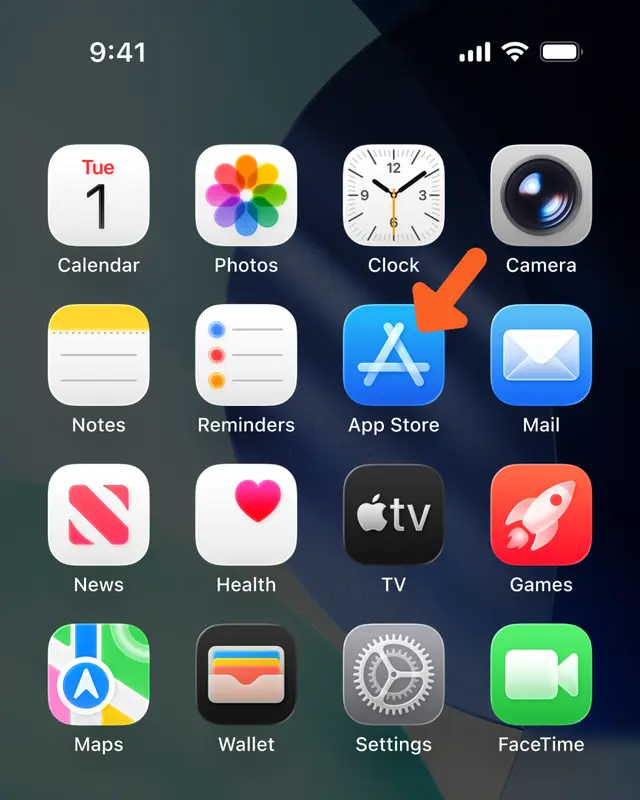
Step 1: Open the App Store
Find the App Store on your iPhone home screen and tap to open it. It is the blue icon with a white letter A.
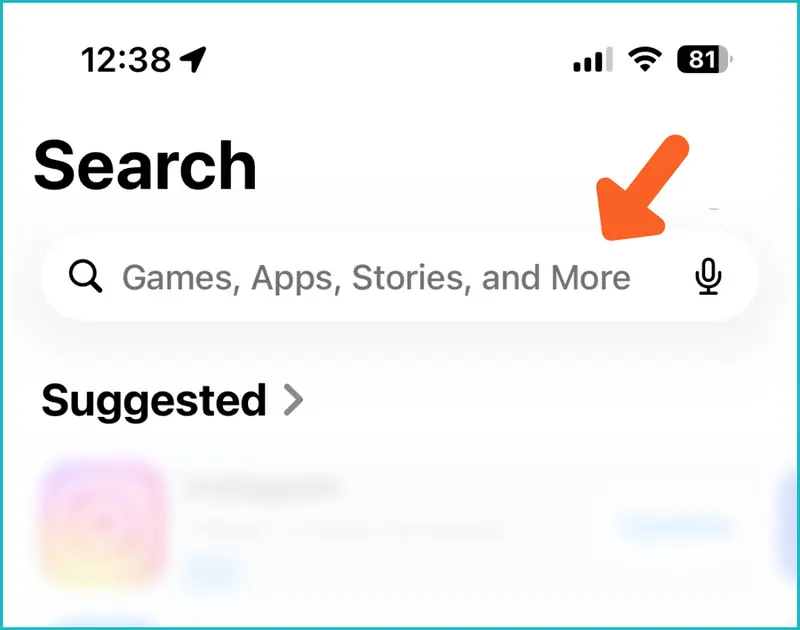
Step 2: Tap the Search bar
Once the App Store is open, tap the Search tab at the bottom of the screen, then tap the search bar at the top.
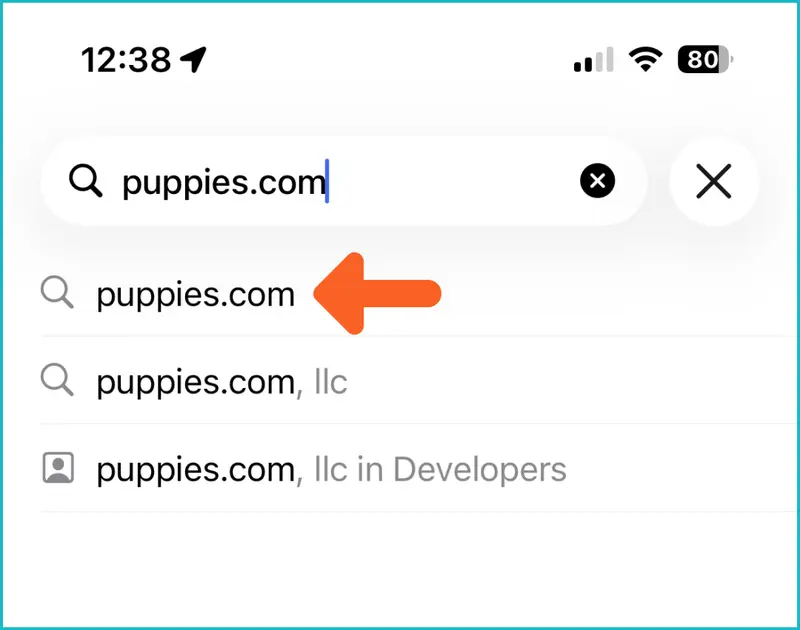
Step 3: Search for Puppies.com
Type "Puppies.com" in the search bar. When the suggestion appears below, tap it to search.
Step 4: Find the Puppies.com App and Tap Get
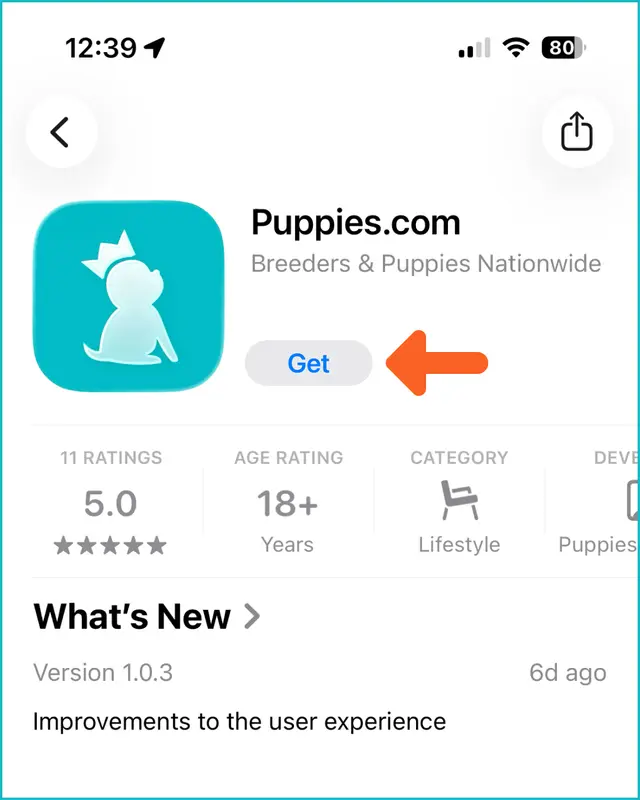
Look for the Puppies.com app: Breeders & Puppies Nationwide is the text you will see beneath Puppies.com, along with the teal Puppies.com icon. Tap Get to download it. The app is always free for buyers and active Puppies.com breeders.
Step 5: Confirm the Download
If prompted for Face ID, Touch ID, or your Apple ID password, that is just your iPhone confirming the download.
Step 6: Open the App
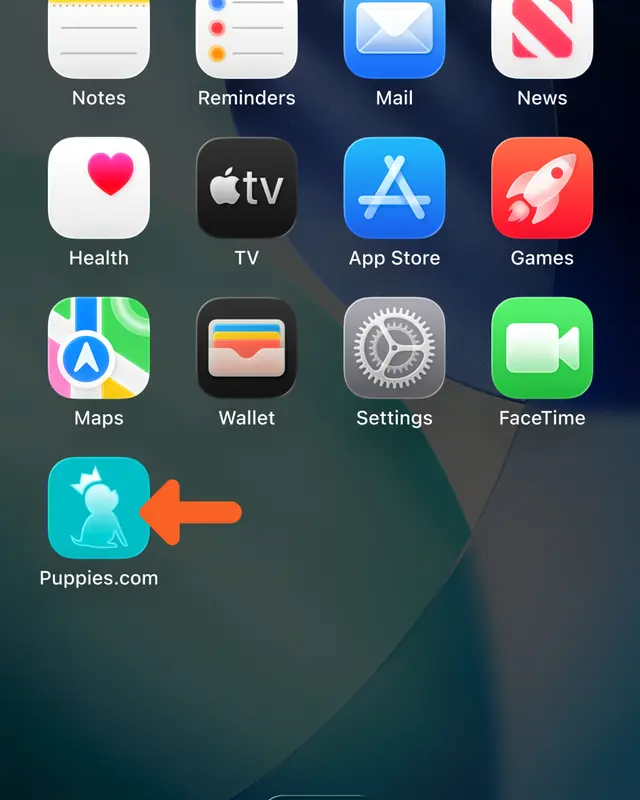
Once the download is complete, the Puppies.com icon will appear on your home screen. Tap it to open the app.
Step 7: Sign In or Sign Up
When the app opens, you will see the Puppies.com welcome screen. Tap Sign In if you already have a Puppies.com account and log in with your existing email and password. Tap Sign Up if you are new.

Step 8: Sign In With Your Existing Account
Already a member? Enter your existing Puppies.com email address and password in the app. Everything is right where you left it: your profile, your listing, your messages, and more.
How to Download the Puppies.com App on Android
Step 1: Open Google Play on your Android device.
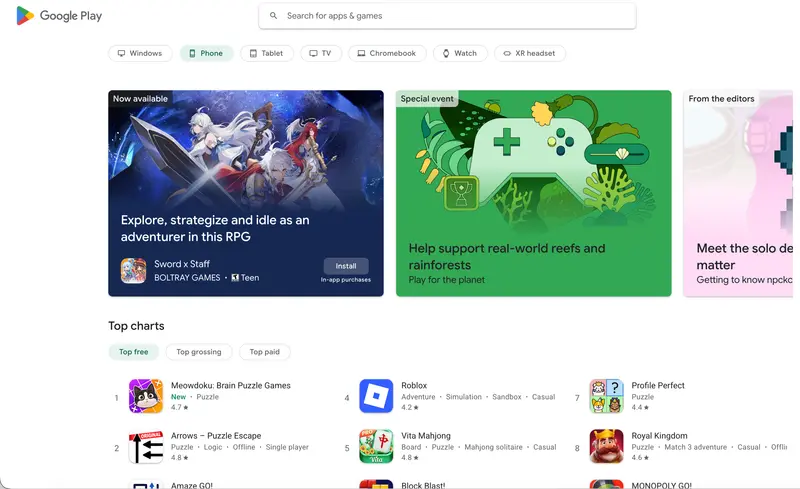
Step 2: Tap the search bar at the top of the screen.
Step 3: Type "Puppies.com" and tap Search.
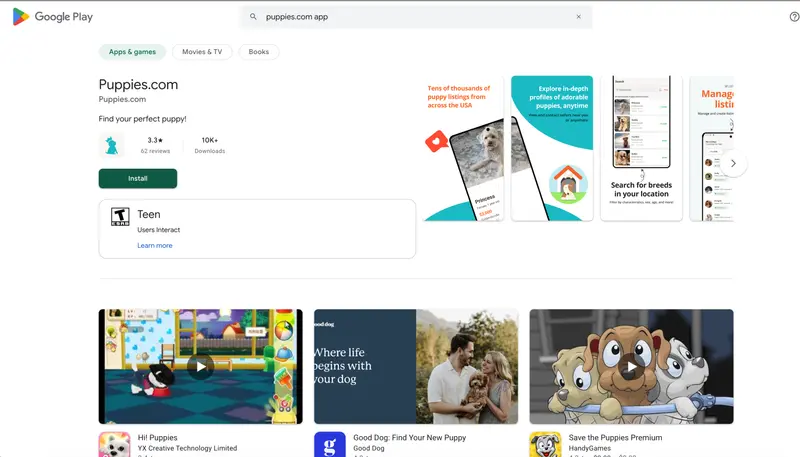
Step 4: Find the Puppies.com app and tap Install. The app is free to download.
Step 5: Once installed, open the app from your home screen or app drawer.
Step 6: Already have a Puppies.com account? Tap Sign In to log in with your existing Puppies.com email and pawword, or tap Sign Up to create a new account.
Frequently Asked Questions
Is the Puppies.com app free to download? For puppy seekers, yes, the app is free to download and use. For active breeders, yes, the app is free to download and use. If you want to list your puppies on Puppies.com and do not already have an active account, you will be prompted to create an account.
Is the app available for both iPhone and Android? Yes. The Puppies.com app is available on the App Store for iPhone and on Google Play for Android devices.
I already have a Puppies.com account. Do I need to create a new one? No. Download the app and sign in with your existing Puppies.com email and password. Your listings, saved puppies, messages, and profile are all there waiting for you.
What can buyers do in the app? Buyers can search thousands of verified puppy listings by breed, location, age, and price; save favorite puppies; set alerts for new listings that match their criteria; view verified breeder profiles and testimonials; and message breeders securely through the app.
What can breeders do in the app? Breeders can manage all their listings on the go: add, edit, and update puppies from anywhere; receive real-time buyer inquiry notifications; message buyers securely through the app; and view and respond to buyer inquiries immediately.
Is my information safe on the app? Yes. All communication happens through Puppies.com's secure in-app messaging system. Your personal contact information is never shared directly through the platform.
What if I need help downloading or using the app? Follow our step-by-step guide above for detailed instructions with screenshots. You can also contact our support team at [email protected].
The app is showing an old version on Google Play. What should I do? If you previously downloaded an older version of the Puppies.com Android app, go to Google Play, search for Puppies.com, and tap Update to install the latest version. The updated app includes significant improvements to the user experience.
Can I use Puppies.com on my phone without downloading the app? Yes. Puppies.com is accessible through any mobile browser at puppies.com. However, the app offers a faster, more streamlined experience with push notifications, alerts, and in-app messaging all in one place.
Where can I leave feedback about the app? After trying out the app, we would love to hear from you. Leave a review on the App Store or Google Play as your feedback helps us keep improving. You can also reach our team directly at [email protected].
Why does the app say 18+ in the App Store? The 18+ age rating reflects Apple's standard rating for marketplace- and classifieds-style apps that involve financial transactions. The app is family-friendly and appropriate for all puppy lovers.
The Puppies.com App Is Here
Whether you are searching for the puppy you have always wanted or running a breeding program and ready to reach more buyers than ever, the Puppies.com app puts America's most trusted puppy platform right in your pocket.
Download the Puppies.com App
[Download on the App Store] | [Get it on Google Play]